How PickleEQ members opt in to text messages
PickleEQ™ sends pickleball session logistics to registered members who have asked for them: a one-time verification code when a member adds a phone number, weekend availability polls for their group, and confirmations of court assignments and playing times. This page exists so the consent flow can be reviewed without a PickleEQ account, because opting in happens inside a member's own account settings.
Consent takes two steps, and both are required
In Settings the member types their own mobile number and ticks a box that is never pre-ticked. PickleEQ then sends a six-digit verification code to that number, which the member must enter. Until both the tick and the code are done, the only message that number ever receives is the code itself. Consent is not a condition of using PickleEQ™.
The consent wording, exactly as it appears
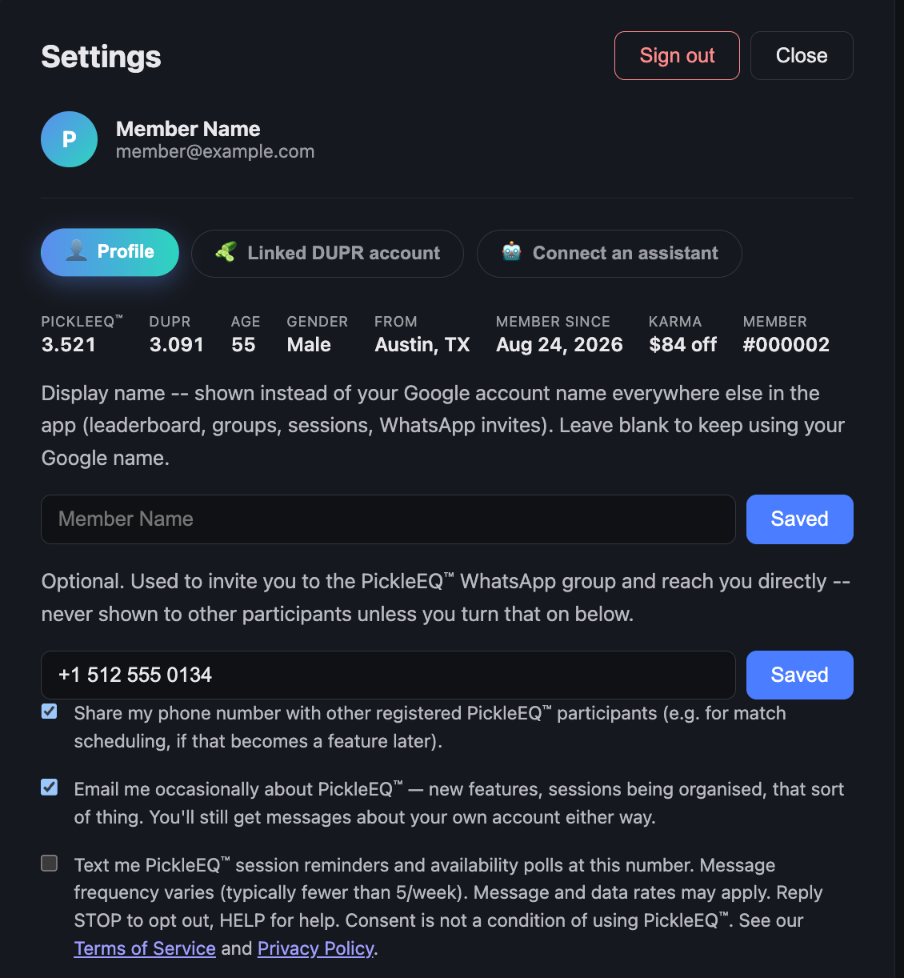
Text me PickleEQ™ session reminders and availability polls at this number. Message frequency varies (typically fewer than 5/week). Message and data rates may apply. Reply STOP to opt out, HELP for help. Consent is not a condition of using PickleEQ™. See our Terms of Service and Privacy Policy.
Message frequency varies, typically fewer than five messages per week. Message and data rates may apply. Reply STOP to opt out at any time, or HELP for help.
No mobile information is shared with third parties or affiliates for marketing or promotional purposes.
PickleEQ™ sends no marketing texts of any kind. Every message is about a session the member is part of.
The opt-in screen
What members receive
PickleEQ: Your verification code is 123456. It expires in 10 minutes. Reply STOP to opt out.PickleEQ: The availability poll for Sat Sep 20-Sun Sep 21 is open for your group. Tell us which times work: https://pickleeq.io/groups/1/polls/42 Reply STOP to opt out.PickleEQ: You're on court 3 on Saturday at 9:00am with Dana, Chris and Sam. Reply STOP to opt out.PickleEQ: Reminder - your Tuesday Ladder session starts at 9:00am today at The Picklr Austin West. Reply STOP to opt out.PickleEQ: Saturday's 9:00am session has moved to court 5. Details: https://pickleeq.io/groups/1 Reply STOP to opt out.
Stopping the messages
Replying STOP to any message stops them immediately and permanently until the member asks again. Members can also switch texts off at any time in Settings, which takes effect at once. Stopping texts never affects a member's account or the email PickleEQ™ sends about it.
The documents that govern this
- Privacy Policy (version 1.4) — Section 3.d–3.g covers text messages.
- Terms of Service
Questions about the text-message program go to nell@pickleeq.io, which is the address given in the reply to HELP. General and legal correspondence for the company goes to pickleeq@rpjllc.com, the address in the Privacy Policy. Both reach PickleEQ™; they are not two different businesses.